How to Enable and Disable the 'Coming Soon/Maintenance' Page: A Step-by-Step Guide

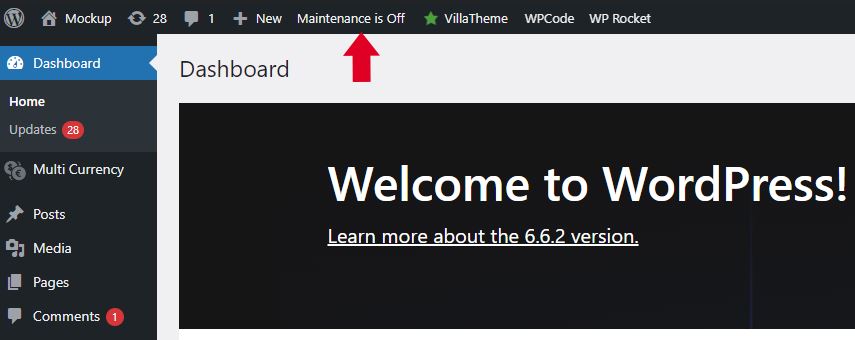
Step1: Go to your WordPress Dashboard and click "Maintenance" button in the tool bar.
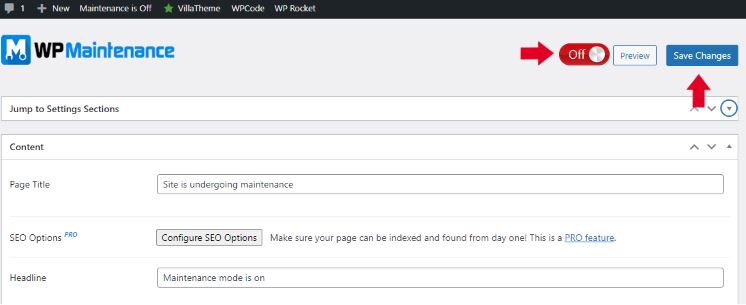
Step2: Edit content section (optional). Click the toggle button (On/Off) and click "Save Changes".
That's it! We hope that this walkthrough helped you today and if you need further assistance, please feel free to open a Techincal Support ticket.

OpenTechTicket


  • 0 Users Found This Useful
Was this answer helpful?

Related Articles

How to access and manage cPanel Email Account via DatastiQ Webmail

One of the common questions that we receive from our dear clients is how to access and manage...

How to create a cPanel Email Account

Once you subscribed to any hosting plan with DatastiQ, you will be entitled to have our cPanel...

How to set up Auto-SSL (https)

  One of the main and big selling points we have in DatastiQ is our free and automatic SSL...

How to Configure Email on Android Phone

Once you have created your first cPanel Email account in your DatastiQ profile, you might be...

How to Transfer your Domain from another Registrar

Transferring a domain to DatastiQ is easy and all you need to do is to consider a few...

Powered by WHMCompleteSolution